
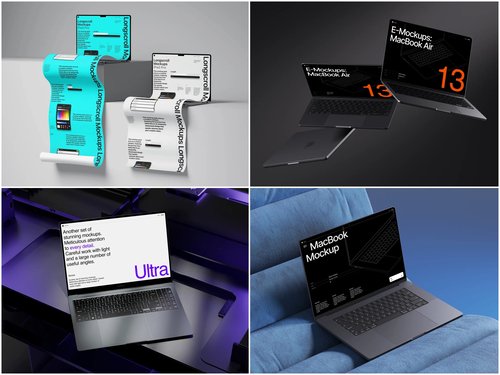
Why Visual Context Matters in Beta Testing
When launching a beta test, you’re asking users to evaluate something incomplete. Raw screenshots floating in documentation don’t tell the full story. A laptop mockup transforms those interface captures into tangible experiences, showing your app exactly as users will encounter it—on an actual device, in a real environment.
This visual authenticity bridges the gap between abstract functionality and practical application. Beta testers can immediately understand how features fit into their workflow when they see them displayed on a realistic screen rather than isolated in a vacuum.
Creating Compelling Beta Presentations
The right mockup does more than dress up your screenshots. It establishes context. Imagine presenting a productivity app’s dashboard on a sleek MacBook in a workspace setting versus showing the same interface as a raw PNG file. The mockup instantly communicates professionalism, intended use case, and target audience.
For beta recruitment materials, this visual storytelling becomes crucial. Potential testers scrolling through your announcement need to grasp your app’s value proposition in seconds. A well-crafted laptop mockup delivers that understanding immediately, increasing sign-up rates and attracting more qualified participants.
Highlighting Specific Features Effectively
Different angles serve different purposes in feature visualization:
- Straight-on views work best for demonstrating complex interfaces where every element needs clear visibility
- Angled perspectives add depth and professionalism to hero images in beta invitations
- Close-up crops draw attention to specific UI components or new functionality you’re testing
Switching between these presentation styles keeps your beta documentation visually engaging while maintaining focus on what matters—the features themselves.
Real-World Applications in Beta Campaigns
Several successful beta launches have leveraged mockups strategically. A project management startup used laptop mockups showing their Kanban board interface on devices in different work environments—coffee shops, home offices, corporate settings. This helped beta testers self-identify with specific use cases before even downloading the app.
Another example comes from an educational platform that created a series of mockups demonstrating their video conferencing features. By showing the interface on laptops from various angles, they illustrated how teachers and students would interact with the platform. Beta feedback specifically mentioned that the mockups helped testers understand the feature scope before testing began.
A finance app utilized dark-mode laptop mockups to showcase their analytics dashboard, which resonated strongly with their target demographic of data professionals who work in low-light environments. The mockups informed beta testers about optimal usage conditions.
Premium Mockups from ls.graphics
When quality matters for your beta presentation, the laptop mockup collection at ls.graphics delivers exceptional results. These mockups stand out for several reasons:
- Ultra-realistic rendering makes your app screenshots indistinguishable from actual device photography, lending immediate credibility to your beta materials
- Organized layer structure allows you to swap interface designs in minutes rather than struggling with complex file hierarchies
- Multiple angle options provide the perfect perspective for each feature, from detailed frontal views to dramatic angled compositions
- Color style variations enable instant brand matching without requiring additional design expertise or time-consuming customization
The minimalistic compositions keep attention focused on your app rather than competing with distracting background elements. Even designers without extensive mockup experience find these templates remarkably intuitive—the workflow stays simple while the output remains professional-grade for presentations, landing pages, and beta documentation.
Conclusion
Laptop mockups transform beta testing presentations from functional to compelling. They provide the visual context that helps potential testers understand your app’s purpose, evaluate its interface design, and imagine themselves using it. By investing in quality mockups early in your beta cycle, you create documentation that attracts better testers, communicates features more clearly, and ultimately generates more useful feedback. The small effort of mockup creation pays dividends throughout your entire testing phase.